Stream NetMirror Web in any browser.
Tired of paying for Netflix, Prime Video and a dozen other apps just to watch what you actually want? Meet NetMirror Web, the ultimate way to stream Netflix, Prime Video, JioHotstar and 5 more OTT platforms right in your browser, on any PC, Mac, phone or tablet. Completely free, nothing to install, and no account needed to start watching!
- No install
- Any browser
- Up to 4K UHD
- 100% free
One library, eight streaming services
 Netflix
 Prime Video
 JioHotstar
 Apple TV+
 Sony LIV
 Zee5
Zee5 MX Player
 Crunchyroll
Open NetMirror Web
Two ways in: pick a mirror
The web address rotates every few weeks, it recently changed from net22.cc to net27.cc. If one mirror is slow or blocked on your network, open the other, both load the same library. Bookmark this page so you always have the current links.
Old addresses
Old NetMirror links that no longer work
NetMirror’s web address rotates every few months, when an ISP blocks the live domain (court orders or DMCA), a fresh one takes over. The addresses below are now retired and won’t load. If you bookmarked one of these, switch to the current Mirror 1 (net27.cc) above.
- iosmirror.cc Offline
The “iOSMirror” address, the same NetMirror web app aimed at iPhone & iPad users.
- pcmirror.cc Offline
The “PCMirror” address, NetMirror Web for PC & Mac browsers.
- netmirror.cc Offline
One of the original NetMirror web addresses, from the brand’s early days.
- net2025.cc Offline
An earlier address in the rotation, retired after it was blocked.
- net22.cc Offline
The numbered address used just before the current one.
Stuck on a dead link? None of the above will open anymore, use the current working address instead.
Open net27.ccAbout
About NetMirror Web
The browser version of the hugely popular NetMirror app, the same all-in-one streaming experience, opened straight from a web page instead of installed on your device.
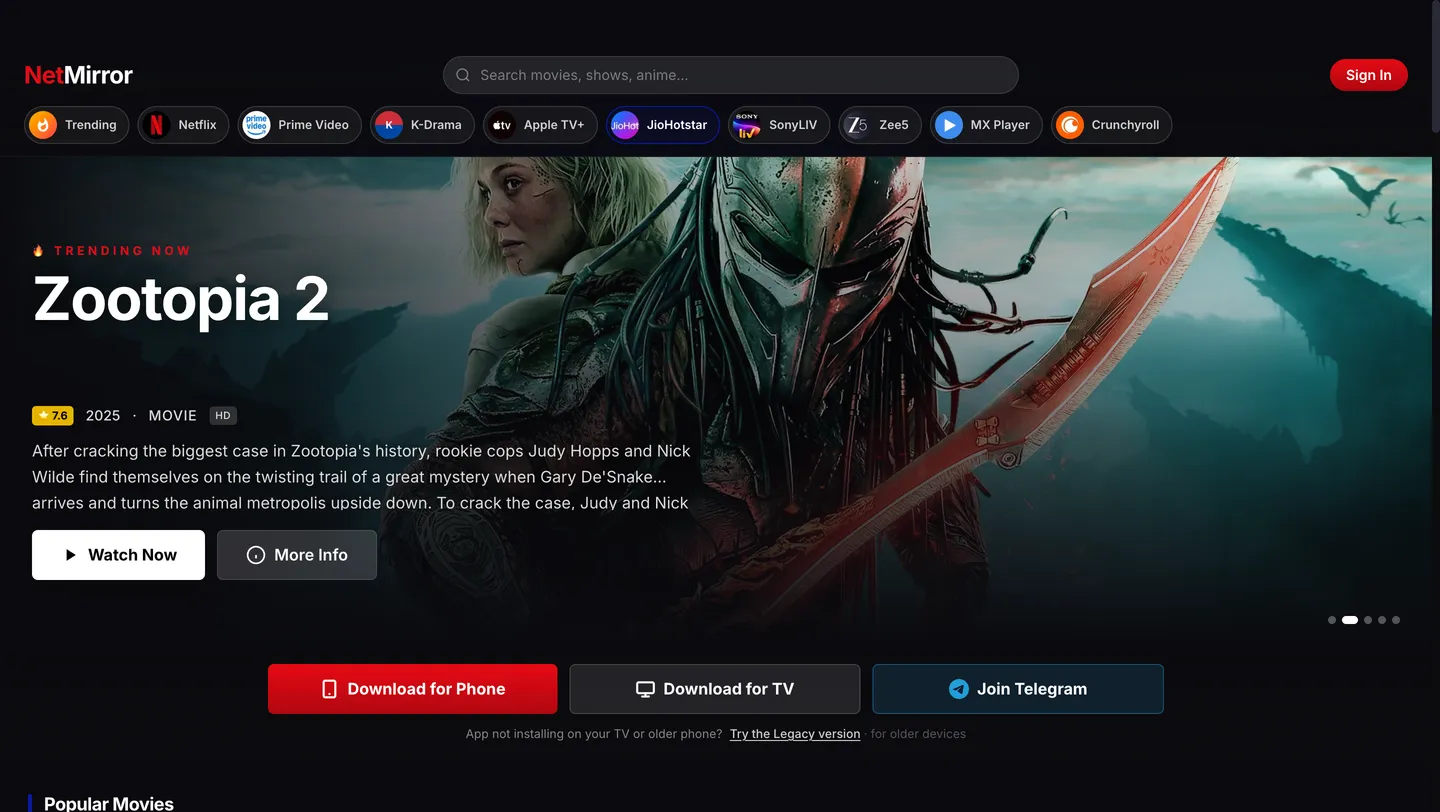
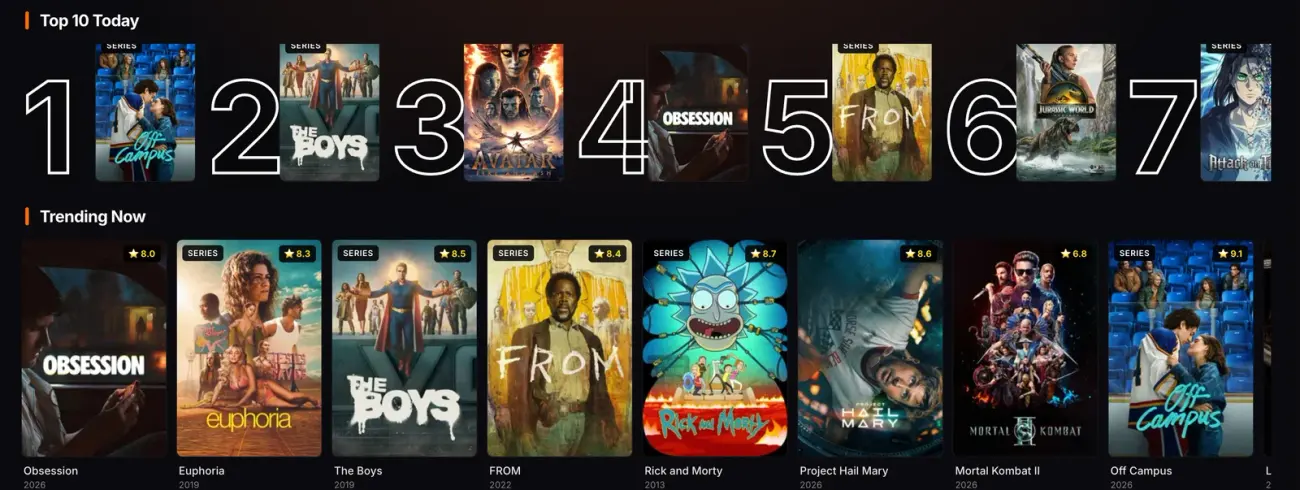
So what exactly is NetMirror Web? While the Android app is something you download and keep on your device, NetMirror Web lives entirely online. You simply visit one address, net27.cc, and the full home screen loads right in your browser: the provider chip row, the featured banner, the Top 10 rail and a search bar that reaches across every catalogue. Press Play on any title and it streams instantly in the built-in player, with the quality scaling to your connection, all the way up to 4K where the source allows.
Behind that single page sit eight massive streaming libraries, Netflix, Prime Video, JioHotstar, Apple TV+, Sony LIV, Zee5, MX Player and Crunchyroll, all stitched into one searchable shelf. Instead of opening eight different sites or apps, you browse every one of them from the same place, with a single search box and one watchlist. It is that seamless.
The best part? There is no sign-up wall at all. NetMirror Web opens in guest mode, so you can start watching without creating an account. Signing in is completely optional and only syncs your list and history across devices. It is free to use and runs without ads, no clip before playback, no banners over the player, just press play and enjoy!
One thing worth knowing: the streaming address changes every few weeks, because internet providers periodically block it. When that happens the old link stops loading and a new one takes its place, so it is best to bookmark a page like this one, which always points to the current working URL, rather than memorising the address itself.
The library
What you can watch on NetMirror Web
NetMirror Web brings together the catalogues of eight streaming services into one massive, searchable library. Movies and web series sit side by side, each with its rating, release year, runtime and full cast. Whether you want the latest blockbuster or an old classic, the clean home screen keeps everything just a click away.
Every title, fully detailed
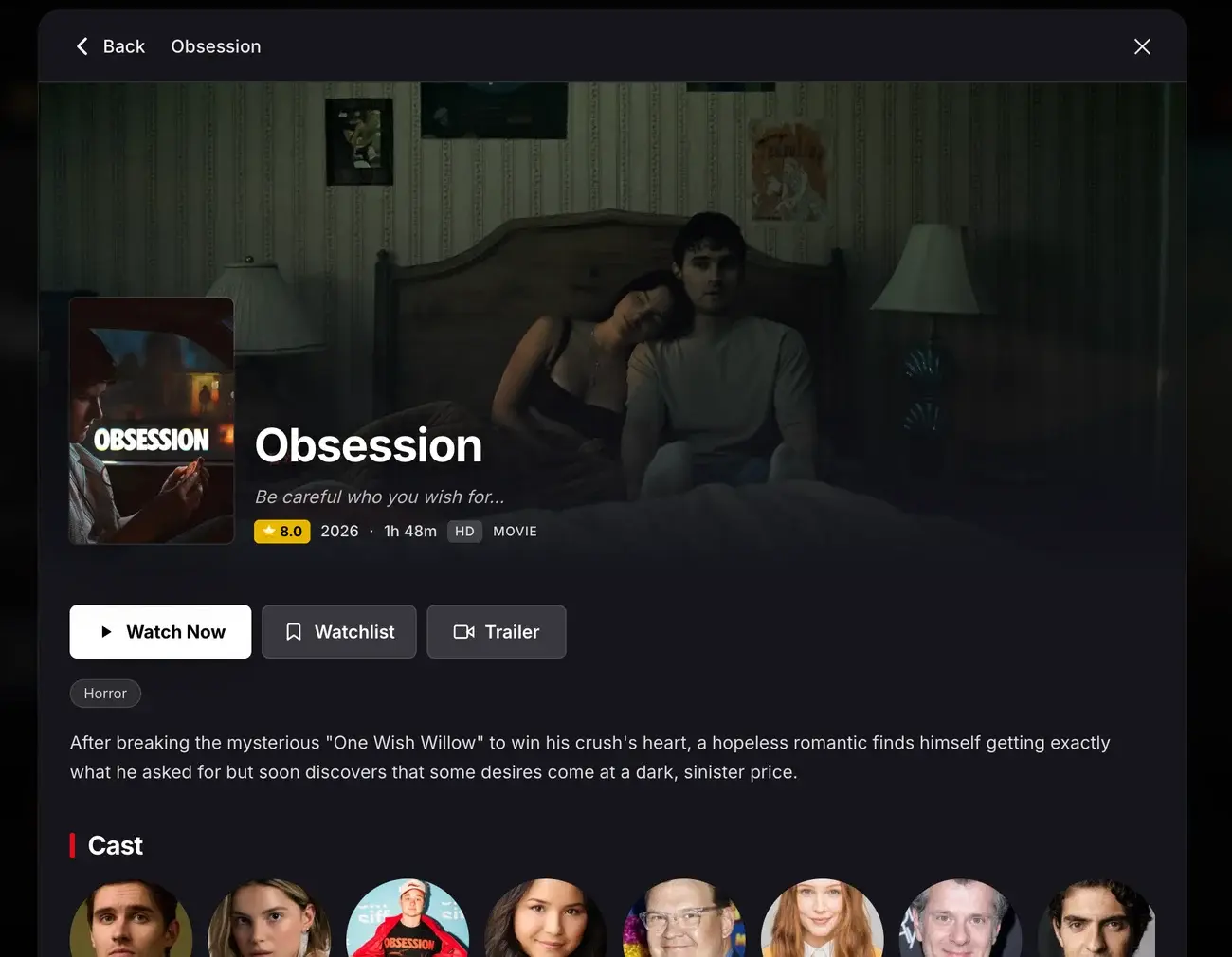
Open any movie or show and you get the full picture before you press play, not just a poster and a name.
- Star rating & release year
- Runtime and HD / up-to-4K quality
- Genre tags
- Full synopsis
- Complete cast list
- Watch Now, Watchlist & Trailer
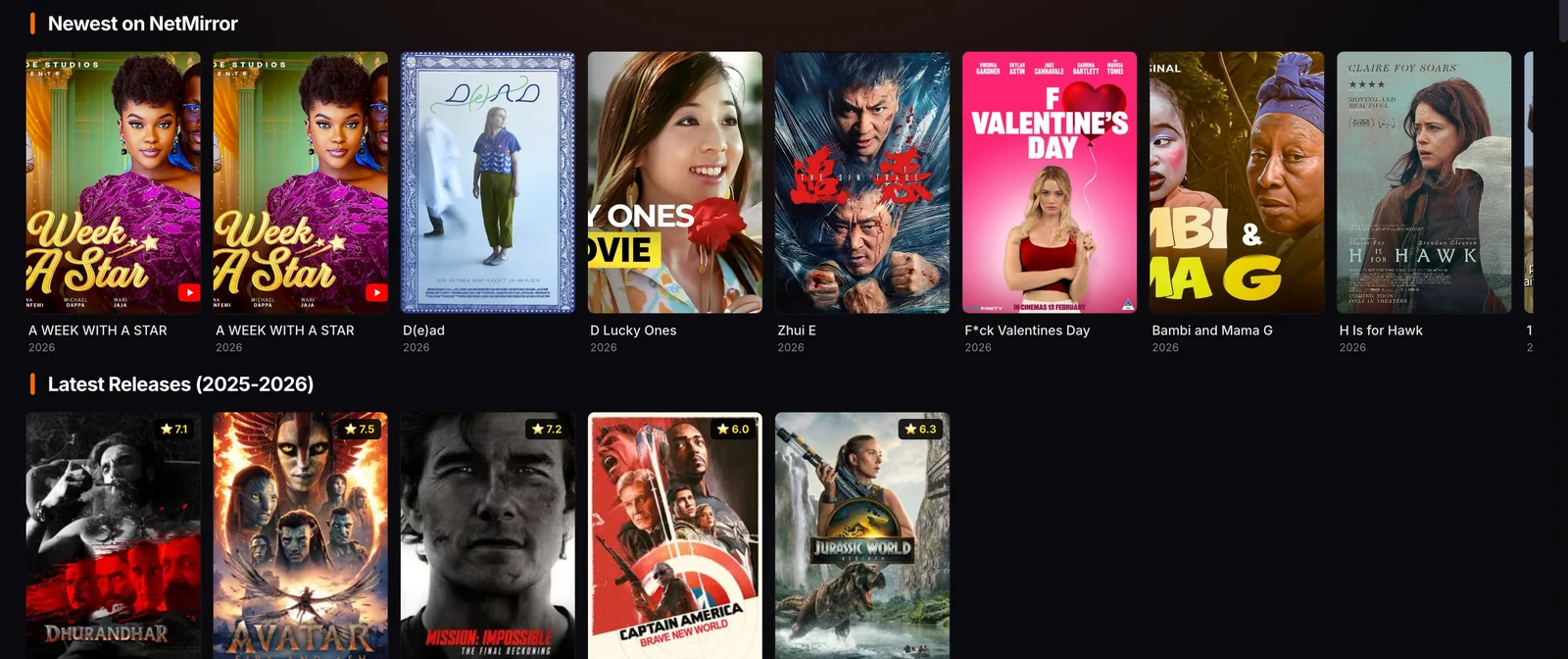
Browse by category
- Movies
- Series
- Hindi
- Tamil
- Telugu
- Hollywood
- Korean
- Anime
- Awards
- Universe
…plus the eight services themselves, Netflix, Prime Video, JioHotstar, Apple TV+, Sony LIV, Zee5, MX Player and Crunchyroll, each one tap away from the same row, with a single search box that looks across all of them at once.
Features
Everything you get with NetMirror
One free app that does the job of a whole stack of paid subscriptions. Here is exactly what is packed inside, so you know just how much you are getting before you press play.
All the latest movies & shows
From this year's biggest blockbusters to the newest series, the latest titles land fast, often the very same day they drop.
Content from every platform
Netflix, Prime Video, JioHotstar, Apple TV+, Sony LIV, Zee5, MX Player and Crunchyroll, all of them living together in a single app.
A massive library
Thousands of movies and series across every genre and language, a library far bigger than any single service can offer.
Korean dramas
A deep K-drama catalogue with current-season hits and timeless classics, plus all the Asian TV you love.
Anime
Simulcast episodes, shounen classics and full movie collections, all gathered in one dedicated Anime tab.
Universal search
One search box looks across every platform at once, so you just type a title and find it anywhere.
Multi-language support
Switch your audio between Hindi, Tamil, Telugu, Korean and more on the titles that offer them.
Subtitles & captions
Clear, easy-to-read subtitles on a growing list of movies and series.
HD & 4K playback
Enjoy sharp HD all the way up to 4K UHD, with the quality adapting automatically to your connection.
Two servers (Server 2 Beta)
If a title won't load on Server 1, just switch to the new Beta Server 2, a second source with more titles, extra dubs and wider subtitles.
A real media player
A proper built-in player with a clean overlay, where play, pause, seek and settings all just work.
Playback options
Take full control of playback speed and aspect ratio, Fit, Fill, Wide or Stretch, to perfectly suit your screen.
Picture-in-Picture mode
Pop the video into a floating window and keep browsing or working in your other tabs.
Offline downloads
Save your favourite titles to watch without internet, and downloads even resume after a long pause.
No ads
No launch ad, no mid-rolls, no banners over the player. You just press play and you are watching.
User-friendly interface
A clean, simple layout where chips, rails and search make everything easy to find.
How to use
How to use NetMirror Online on any device
Whatever device you are on, the exact steps are right below with real screenshots. Just find your device, follow along, and you will be up and running in about a minute.
PC & Mac
Any browser works, Chrome, Edge, Safari, Firefox or Brave. Nothing to install, nothing to set up.
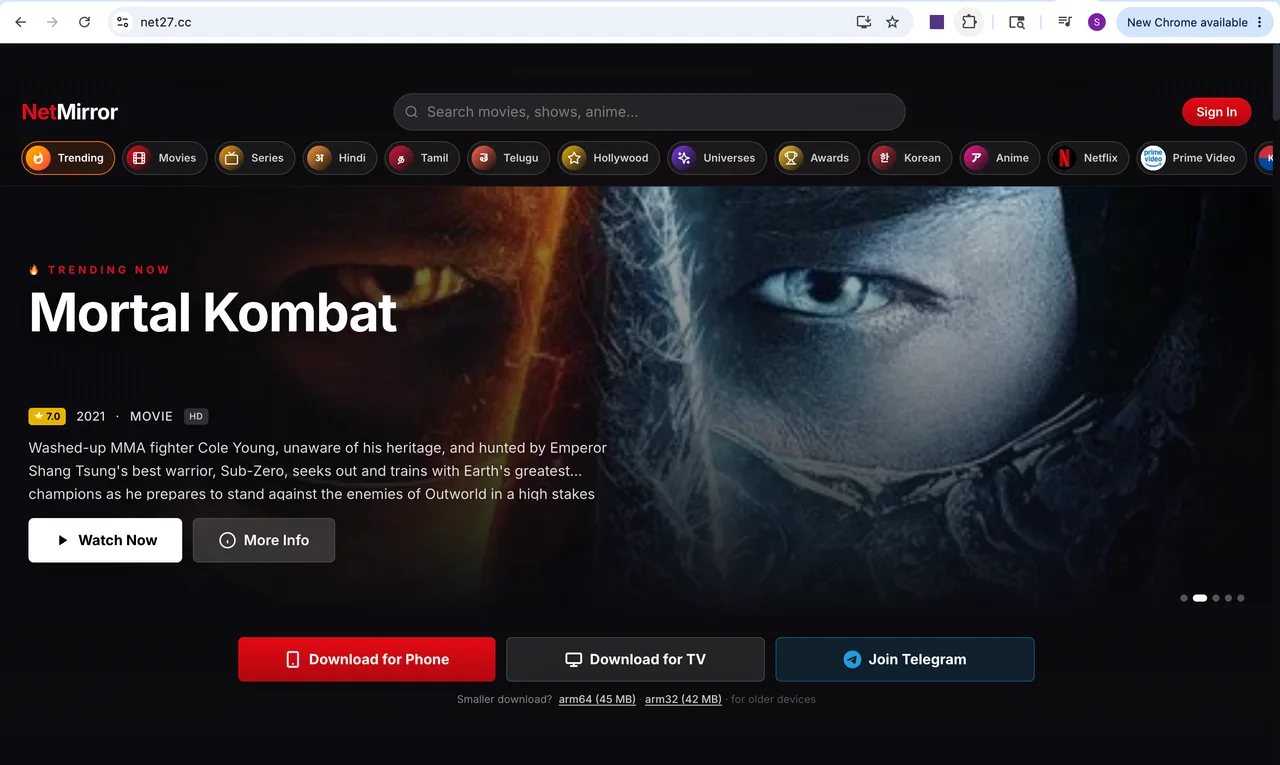 01
01Open net27.cc in your browser
Type net27.cc into the address bar and press Enter. The home screen loads in a couple of seconds, no sign-in needed to start.
- 02
Open a title and press Play
Browse the rails or search across all eight services, click any movie or show, then press Watch Now. Quality adjusts up to 4K.
iPhone / iPad
iOS has no APK, so you add net27.cc to your Home Screen once, it then opens full-screen, just like a real app.
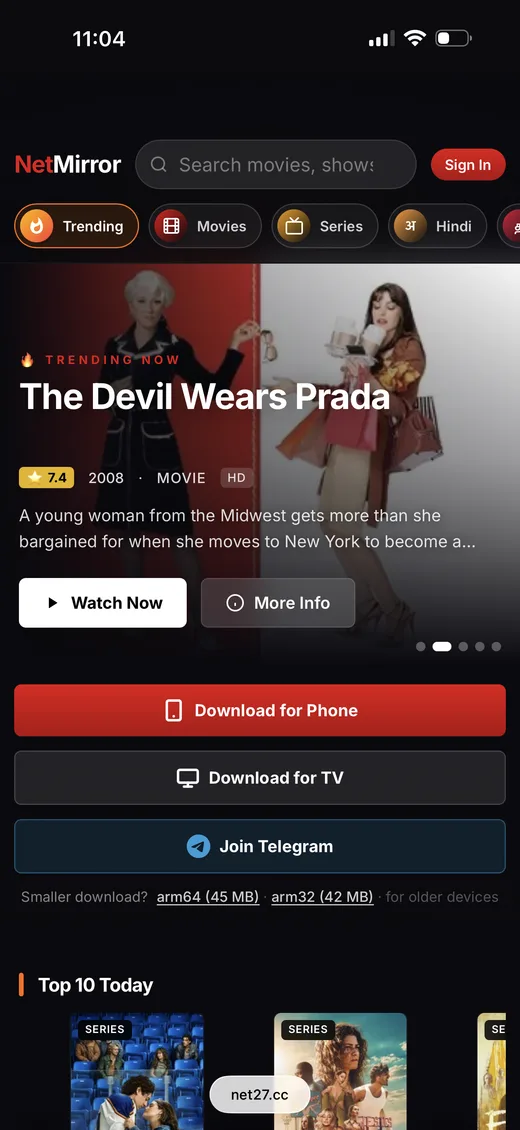 01
01Open net27.cc in Safari
Type net27.cc in Safari and open it, the same home screen as every other device.
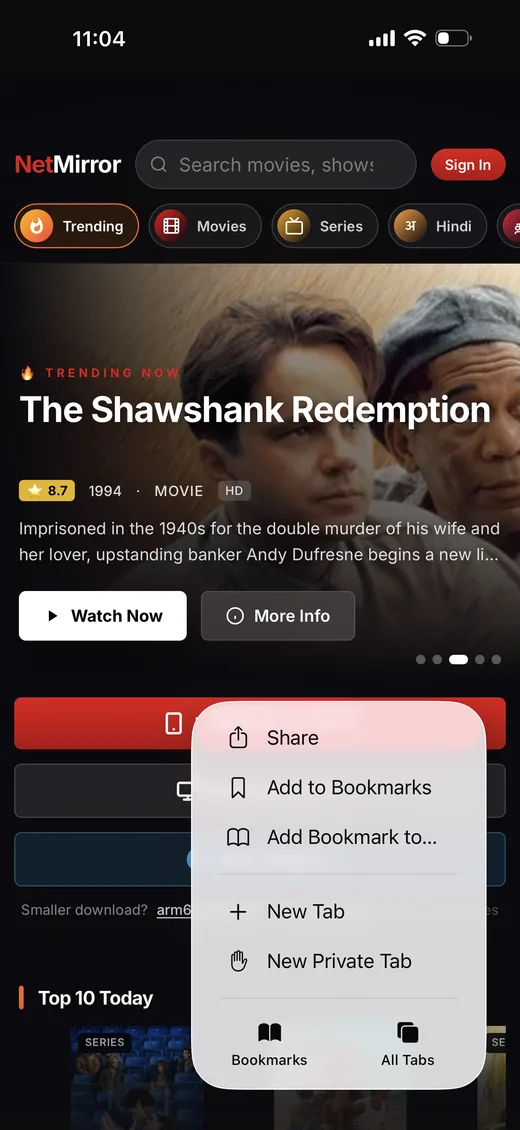 02
02Tap Share, then Add to Home Screen
Open the Share / menu and choose “Add to Home Screen”.
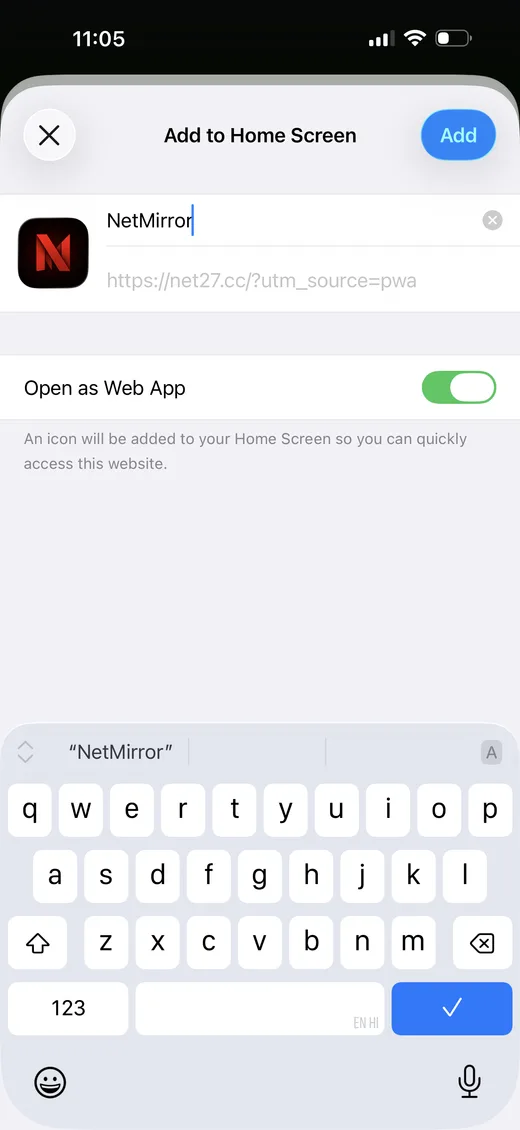 03
03Tap Add
Keep “Open as Web App” turned on and tap Add in the top corner.
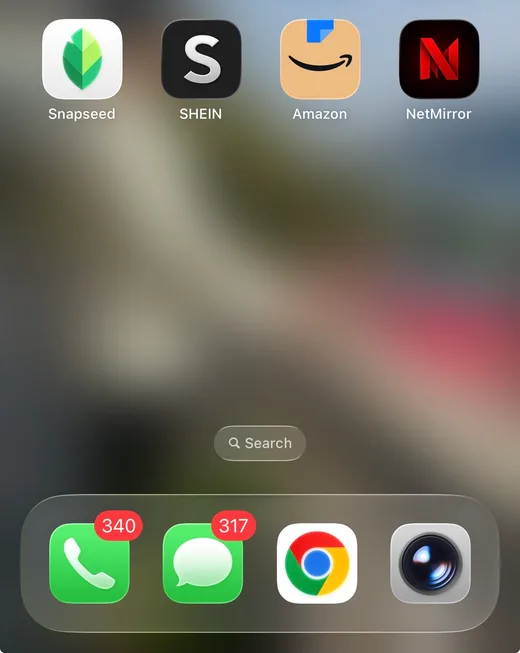 04
04Open it from your Home Screen
A NetMirror icon appears. Tap it to launch full-screen, just like an installed app.
Android
Two ways on Android: use it straight in your browser with zero install, or install the app for offline downloads and the full experience.
Option A, In your browser (no install)
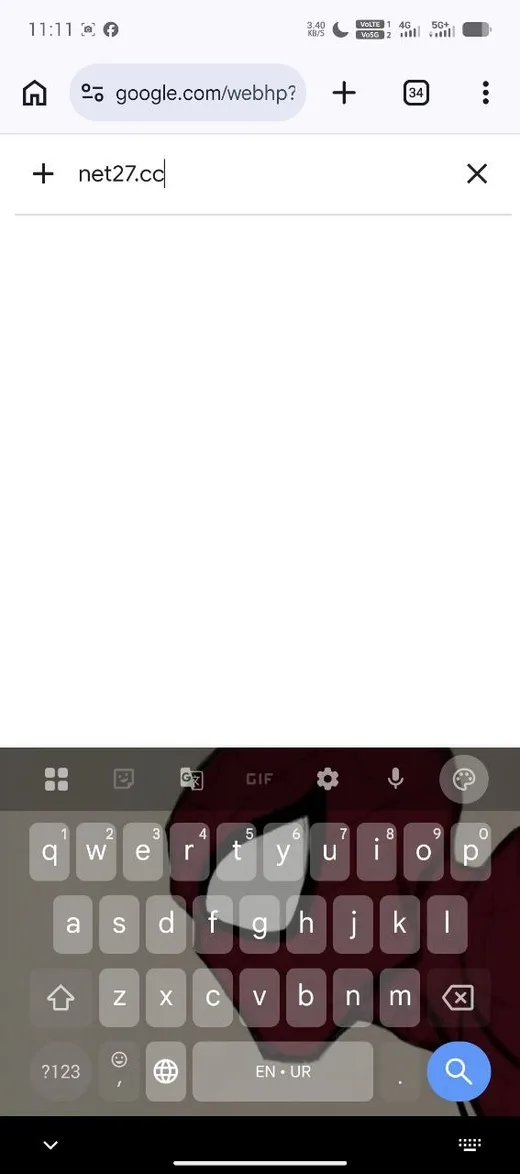 01
01Type net27.cc in Chrome
Open Chrome (or any browser), type net27.cc and go.
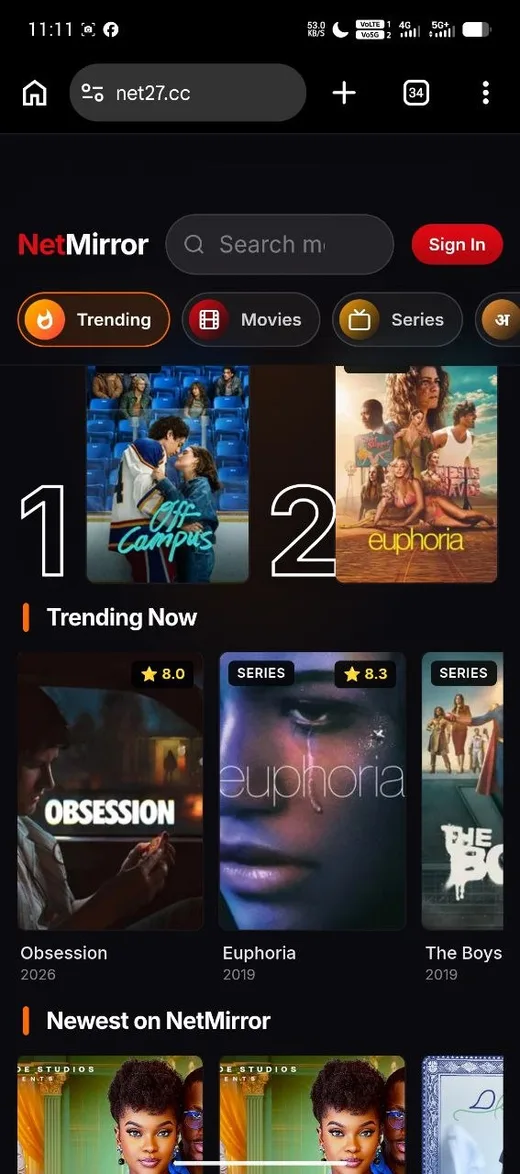 02
02Browse and press Play
The home screen loads with Top 10 and Trending. Open any title and press Play, done.
Option B, Install the app
 01
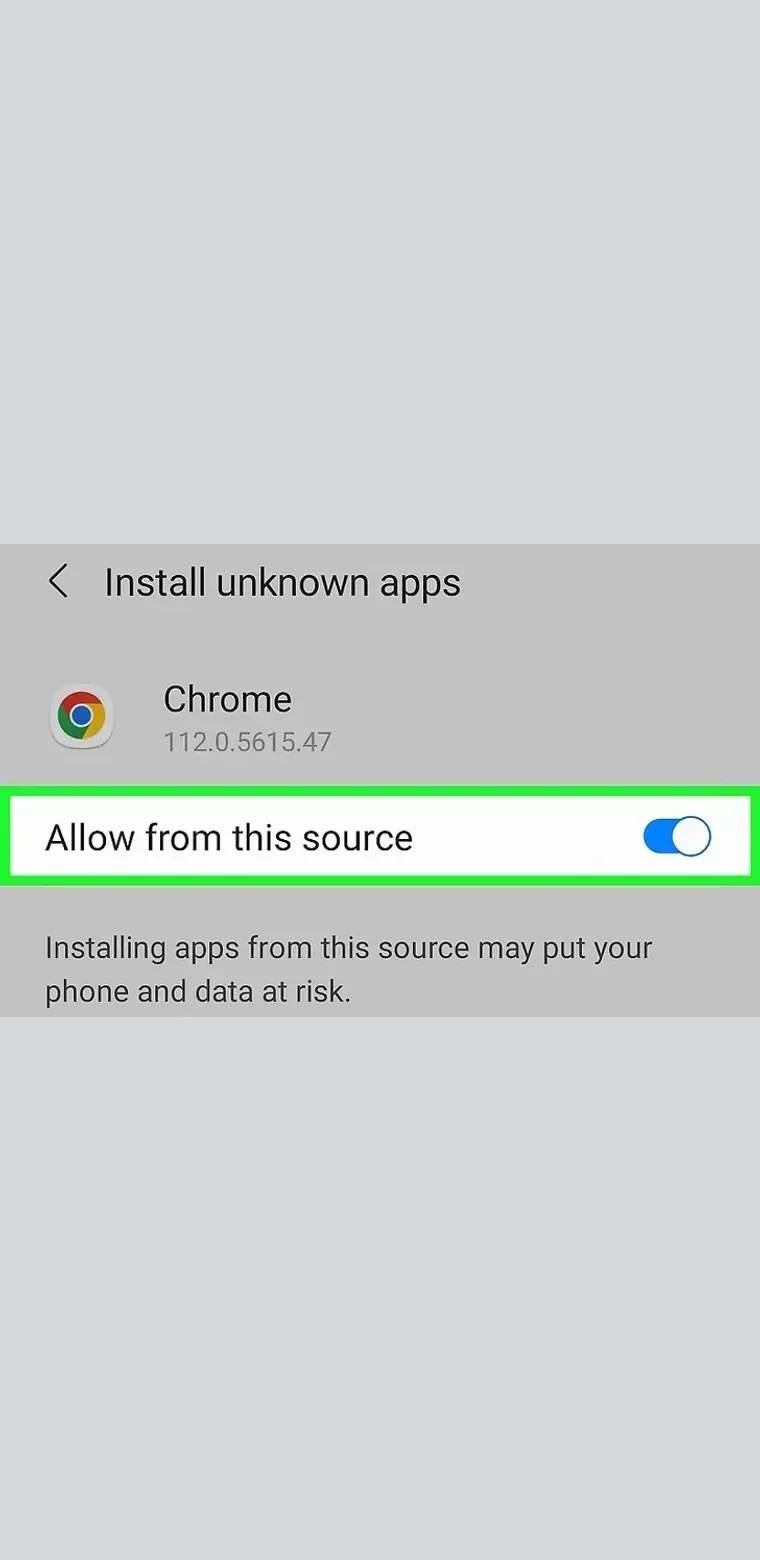
01Allow unknown sources
In Android settings, turn on “Allow from this source” for the browser you download with. It is a one-time toggle that lets the APK install.
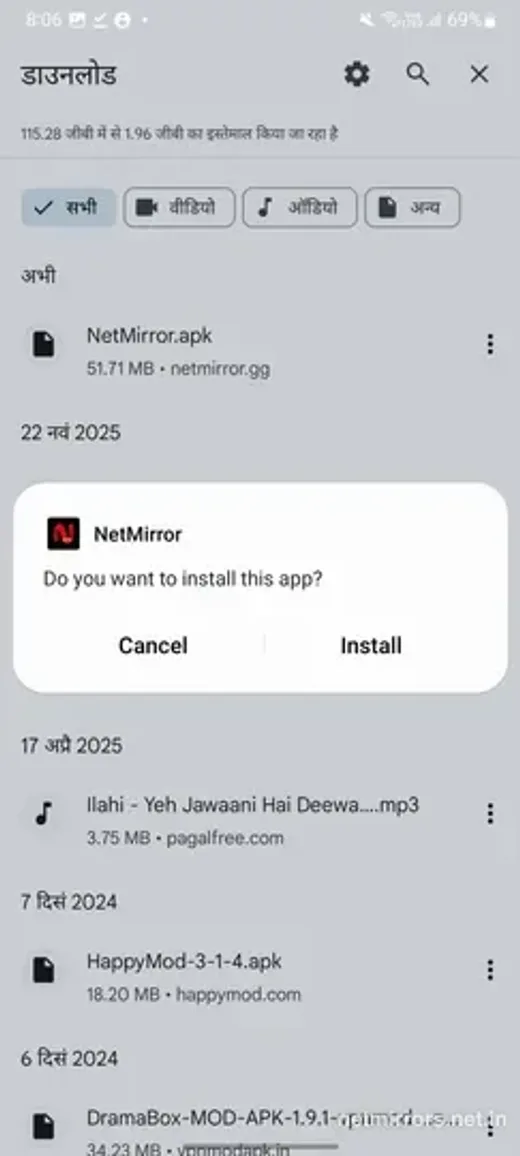 02
02Tap Install
Open the downloaded NetMirror APK and tap Install when the prompt appears.
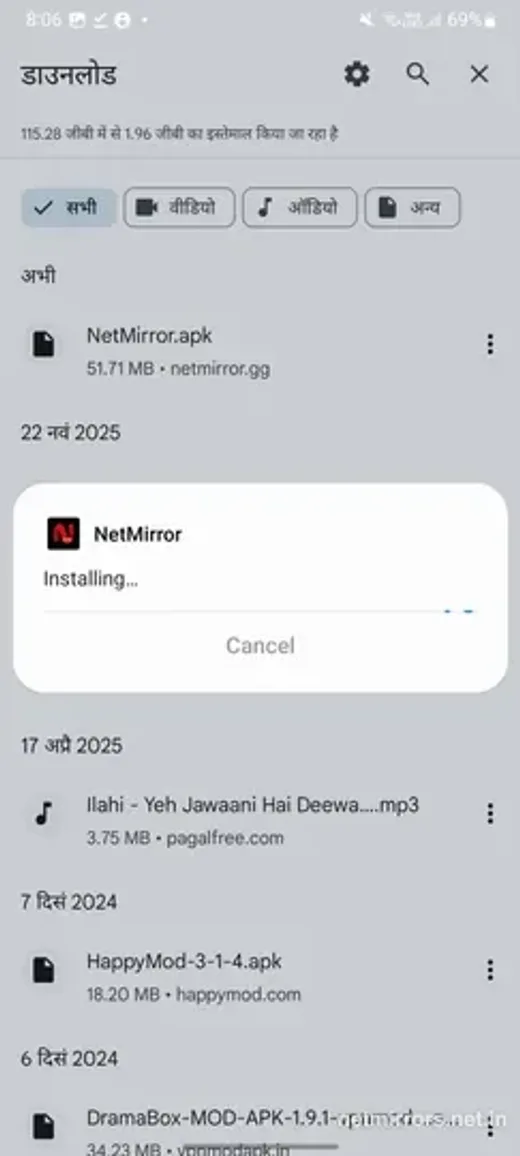 03
03Let it install
Installation takes only a few seconds.
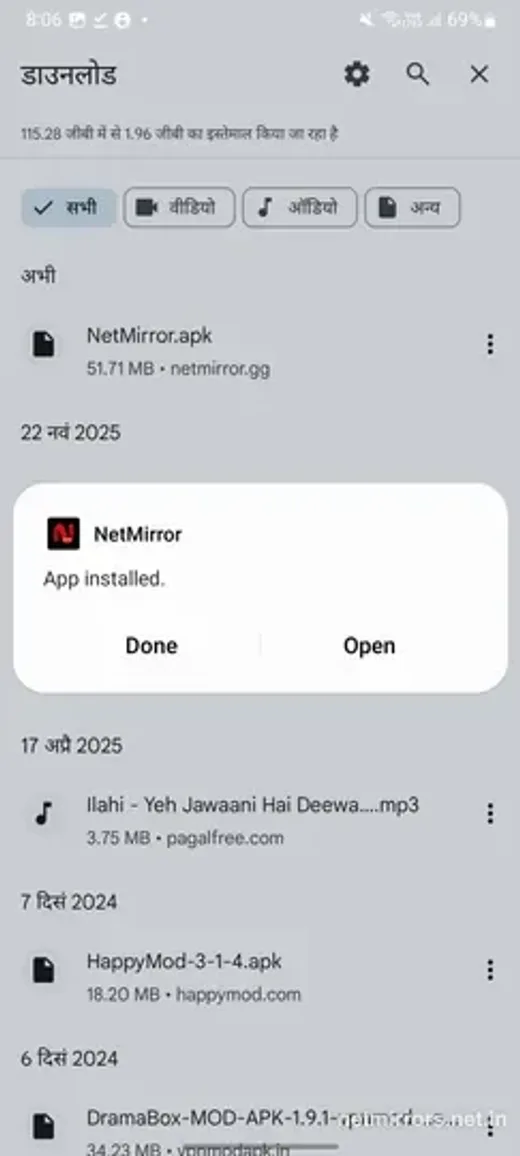 04
04Open and start watching
When it says “App installed”, tap Open, and you are in.
Tip: the streaming address changes every few weeks. Bookmark this page instead, it always points to the current working URL.
Why NetMirror Web
Why people choose NetMirror Web
NetMirror Web wins on the things you actually care about, cost, convenience and zero hassle. Here is exactly why so many people pick the web version.
One free app instead of many subscriptions
Netflix, Prime Video, JioHotstar and five more would easily cost you thousands a year combined. NetMirror Web brings them all together, completely free.
Nothing to install
No APK, no app store, no storage wasted. Just open the link and you are watching within seconds.
The same on every screen
Whether you are on a PC, Mac, phone or tablet, you get one vast library and one watchlist, with no separate apps to juggle.
No ads, no sign-up wall
Press play and watch, that is it! No launch ad, no mid-rolls and no account needed to get started.
Always the latest version
The web version updates itself automatically, so you never chase a new link or get stuck on an old build.
Low-risk by design
It runs entirely inside your browser, so there is nothing installed on your device to worry about. Safe and seamless.
What's new
What's new in NetMirror Web
The latest web release is a huge step up, a fresh redesigned interface, far more to watch, and a smoother, ad-free experience. Here is everything that is new.
- New
Server 2 (Beta): a second source
A new backup server. If a title won't play on Server 1, switch to Beta Server 2 from the Watch screen to unlock more movies and shows, extra audio tracks and wider subtitles.
- Redesigned
A fresh, cleaner interface
The whole web app was redesigned to be simpler and faster to move around, chips, rails and a single search bar up front.
- Expanded
Eight services, not two
It used to carry only Netflix and Prime Video. Now eight OTT platforms, JioHotstar, Apple TV+, Sony LIV, Zee5, MX Player and Crunchyroll too, sit in one library.
- Added
Anime is here
A dedicated Anime section joins the catalogue, simulcast episodes, classics and full movie collections.
- New
Picture-in-Picture mode
Pop the video into a floating window and keep browsing or working in another tab.
- Changed
Sign-in is now optional
Signing in used to be required. Now you watch the whole library as a guest, sign in only if you want your list to sync.
- Removed
No more ads
The web version now runs with zero ads, no launch ad, no mid-rolls, no banners over the player.
- Expanded
A much bigger library
The catalogue has grown well beyond what it carried before, across every genre and language.
- Improved
One search across every platform
Search a movie or show once and it looks across all eight services at the same time, no switching platforms.
Every device
NetMirror for different devices
NetMirror isn't just a website, there is a version tuned for every device. Pick yours to open its own page, with the right download and a simple step-by-step setup made just for it.
Android
The full app, offline downloads, background play and the complete experience on any Android phone or tablet.
Get the Android appPC & Mac
Stream straight from your browser on Windows or macOS, nothing to install, up to 4K, Picture-in-Picture built in.
Open on PC & MaciPhone & iPad
On iOS, add net27.cc to your Home Screen and it runs full-screen, just like a native app, no App Store needed.
Set up on iOSTV & Fire Stick
Android TV, Google TV and Amazon Fire Stick, a remote-friendly app with a big-screen layout and D-pad navigation.
Set up on TV
Comparison
NetMirror vs other OTT platforms
One free app, or a whole stack of paid subscriptions? Let's see exactly how NetMirror stacks up against buying each streaming service on its own.
| Compare | NetMirror | Other OTT platforms |
|---|---|---|
| Streaming services | All 8 in one app | One app per service |
| Price | Free | ₹10,000+ / year combined |
| Ads | None | Ads on most cheaper plans |
| Account to watch | Optional, guest mode | Required for each service |
| Search | One search, every platform | Search each app separately |
| Max quality | Up to 4K UHD | Depends on your plan |
| Install | None, any browser | Each app, on every device |
Subscription prices are approximate India retail figures and change over time, shown only to illustrate the combined cost of separate services.
Safety
Is NetMirror Web and the app safe?
Short answer: yes! The web version is one of the safest ways to stream, because it runs right inside your browser with nothing installed at all. The Android app is safe too, as long as you grab it from the official link on this site. Here is exactly why.
The web version installs nothing
It runs entirely inside your browser, so there is no app on your device, no permissions and no background access. That makes the web the safest way to use NetMirror.
Encrypted connection
Every page loads over secure HTTPS, so the connection between you and NetMirror always stays encrypted.
No account, no personal data
Guest mode means you never have to hand over an email, phone number or card details just to start watching.
No ads, no shady pop-ups
A lot of free-streaming sites are risky because of malicious ads and redirects. NetMirror, on the other hand, runs completely ad-free.
Sideloading the app is normal
“Allow from this source” is a standard, one-time Android toggle, not a security hole, and you can simply switch it back off after installing.
Only the permissions it needs
The Android app only asks for the usual streaming permissions, storage for downloads and network access, and nothing unusual at all.
A few tips to stay safe
- Only download the app from the official link on this site, never random APK sites.
- Once it is installed, you can turn “Install unknown apps” back off.
- Prefer zero install? Just use the web version at net27.cc and skip the APK.
- Keep your browser and Android up to date for the latest security fixes.
Troubleshooting
Not working? Quick fixes
Most issues are just a quick settings change away. Here are the ones people run into most, and how to fix them in seconds.
net27.cc won't open
The address rotates every few weeks and your ISP may have blocked it. Use the link at the top of this page, it always points to the current working URL. If it is still blocked on your network, a reputable VPN helps.
Video keeps buffering
Open the player's gear icon → Quality and switch from Auto to 720p. Auto often picks a higher bitrate than a slow connection can handle. Closing other tabs and downloads helps too.
A title won't play
Refresh the page and try another title to rule out your connection. Make sure your browser is up to date and hardware acceleration is on (Chrome → Settings → System).
No sound or wrong language
Open the player settings to pick the audio track, and check that both your device and the player volume are up and not muted.
Subtitles missing or out of sync
Subtitles depend on the title, open the player settings → Subtitles to switch them on or nudge the timing. More subtitle support is rolling out across the catalogue.
Cast or Picture-in-Picture not working
Casting and PiP work best in Chrome, Edge and Safari. On Firefox they are limited, switch browsers, or use the buttons inside the player.
Tips & tricks
Get more out of NetMirror
A few small tricks that make watching even nicer, and honestly, most people never find them.
Pop the video out
Tap the Picture-in-Picture button to float the player over your other tabs and apps, so it keeps playing while you do other things.
Cast to your TV
Use Chrome's Cast or Safari's AirPlay to throw any title straight onto your Chromecast, Apple TV or smart TV.
Lock the quality
Open the gear → Quality to pin 1080p or 4K, or drop down to 480p to save your data on mobile.
Go full-screen fast
Tap the fullscreen icon (or just press F) for distraction-free viewing, then press Esc to come back.
Bookmark for the latest link
Since the streaming URL rotates, bookmark this page (Ctrl / ⌘ + D) so you always land on the working one.
Search across everything
Type a title just once and the results come in from all eight services at the same time, with no switching platforms.
FAQ
Frequently asked questions
Got questions? Here are quick answers to the things people ask us most about NetMirror Web and the app.
Is NetMirror Web free?
Yes, 100% free! There is no subscription, no trial and no hidden charges at all. You just open the site and start watching, it is that simple.
Do I need an account to watch?
Not at all. NetMirror Web opens straight in guest mode, so you can start streaming right away. Signing in is completely optional and only syncs your watchlist and history across your devices.
Is NetMirror safe to use?
Absolutely. The web version runs entirely inside your browser, so nothing gets installed on your device. The Android app is safe too, as long as you grab it from the official link on this site.
Which devices does NetMirror Web work on?
Pretty much any device with a modern browser. Windows PC, Mac, Android phone, iPhone, iPad and most Smart TV browsers. You get the same vast library everywhere, anytime, anywhere.
Why does the web address (net27.cc) keep changing?
Internet providers sometimes block the streaming domain, so the address rotates every few weeks. No worries, just bookmark this page and it will always point you to the current working link.
Does NetMirror Web have ads?
Nope! No launch ads, no mid-rolls and no banners covering the player. Just clean, seamless, ad-free streaming.
Can I download titles to watch offline?
Offline downloads are part of the Android app, not the web version. If you want to watch without internet, simply install the app. Otherwise, the web version streams everything online, completely free.
What's the difference between NetMirror Web and the app?
The web version needs zero install and runs in any browser. The app adds extras like offline downloads, background play and notifications. Almost everything else, the full library, universal search, up to 4K and Picture-in-Picture, you get on both.
What can I watch on NetMirror?
Movies, web series, anime and so much more from eight services, Netflix, Prime Video, JioHotstar, Apple TV+, Sony LIV, Zee5, MX Player and Crunchyroll, all in one searchable library.
Do I need a VPN?
Usually not. This page always links to the latest working address, so you rarely need one. A good VPN only helps if the streaming domain happens to be blocked on your specific network.
The bottom line
Conclusion
In conclusion, NetMirror Web is the ultimate way to bring eight streaming services into a single, searchable library, completely free, ad-free and install-free, on any PC, Mac, phone or tablet. No subscriptions to juggle, no account to create, just open the page and press play. Give it a try, we are confident you will love it.
Bookmark this page so you always have the latest working address.